


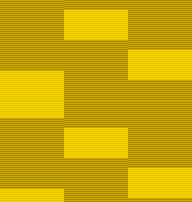
I made a simple script to generate a GIF animation with 1px-high horizontal stripes to resemble scanlines, with a portion of them being illuminated in a sequence.
This is a simple user interface for the script, where you can set the parameters and experiment.
Note that the image creation will take some time.
Please don't link to the URLs here using <img> elements
on your website, place your own copy of the file there. (This server
would serve the image very slowly.)
Download the Perl5 script and ensure
that you have a working ImageMagick executable
called magick on your machine.
All the script does is generating the (raw) image data and feeding that into ImageMagick.
The code isn't very clean. Also, there are sixteen positional CLI arguments. Provide the arguments like this:
crtscan.pl odd_lo_R odd_lo_G odd_lo_B   \ #  odd scanline color,  dark area
           evn_lo_R evn_lo_G evn_lo_B   \ # even scanline color,  dark area
           odd_hi_R odd_hi_G odd_hi_B   \ #  odd scanline color, light area
           evn_hi_R evn_hi_G evn_hi_B   \ # even scanline color, light area
           width                        \ # image width
           lo_height hi_height          \ # height of the dark and light areas
           frame_delay                  \ # speed in ticks
            > output_file.gif
(Substitute all the texts with the respective values.)
RGB values are provided as three separate (decimal) arguments in range 0–255.